
Electronics
These desk gadgets combine something useful with a design that stands out. They're tech for your workspace, from portable storage to clocks. Some even show you the temperature and humidity of your room.
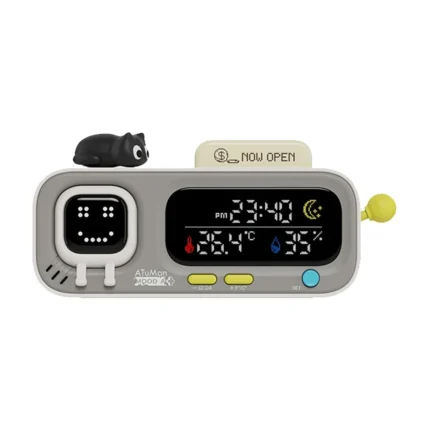
MOOD A Retro Desk Clock with Temperature and Humidity
Original price was: $99.99.$49.99Current price is: $49.99.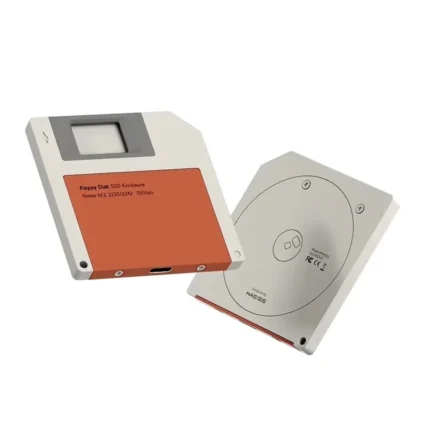
It's a small device made for your workspace that solves something practical, like storing your files or measuring your surroundings, and also looks good next to your computer. At Gizter, we choose them for both: they have to be useful every day and have a design that stands out.
Desk Gadgets That Combine Design and Function
Each one serves a different purpose. This table shows what it's for and what makes it different:
Swipe the table to the left to see all columns →
| Product | What it's for | What makes it different | Connectivity |
|---|---|---|---|
| Hagibis Floppy SSD Enclosure | Turn a 2230 or 2242 M.2 NVMe SSD into an external drive | Floppy disk design, 6.1 mm and 53 g | USB-C, up to 10 Gbps |
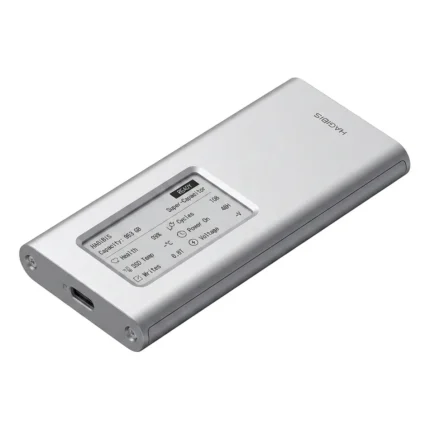
| E-Ink Display SSD Enclosure | Turn a 2230, 2242, 2260 or 2280 M.2 NVMe SSD into an external drive | E-Ink display and a supercapacitor that protects your data | USB-C, up to 10 Gbps |
| MOOD A Clock | Checking the time, temperature, and humidity, with reminders to drink water | Retro Pixel display and mechanical joystick | Rechargeable battery via USB-C |
What to Check Before Choosing a Desk Gadget
- Connection: USB-C is the most practical option today. Make sure your computer has that port, or keep an adapter handy.
- Power: some run while plugged into your computer and others on a rechargeable battery. If it uses a battery, check how often it needs charging.
- Compatibility: for storage, confirm which type of drive it supports. For example, an SSD enclosure only works with M.2 NVMe drives of the length listed on its product page.
- Size and weight: if you'll carry it in your bag or pocket, check the dimensions; if it stays on your desk, how it looks matters more.
- Design: you'll see a desk gadget every day, so choose one that fits your space and that you enjoy having in view.
If you're looking for something for photos and video with your phone, check out our phone accessories.
Desk Gadget FAQs
Ones that get used every day and catch the eye work great, like a clock with a retro display or an SSD enclosure with a floppy disk design. If you don't know what computer the person has, choose one that doesn't depend on it, like a battery-powered clock.
The ones that connect to your computer, like the SSD enclosures, work with Mac and Windows via USB-C, with no software to install. Others, like the MOOD A clock, don't need a computer: the USB-C port is only for charging.
It lets you use an M.2 SSD as an external drive. For example, if you upgraded your laptop's drive, you can reuse the old one for backups or to carry your files to any computer.